 In early November, we all woke up to find Adobe Creative Cloud waiting to be updated. What—again? Well, it turns out that this update, CC 2017, does provide some InDesign enhancements that might help you work more effectively and improve your design. We’ll discuss the significant ones here. [Read more…]
Archives for 2016
Adding images and numbers to tables in InDesign
 Tried adding images to tables in InDesign? There are lots of features you can add to your tables in InDesign to make them more appealing and easier to follow for your readers. Three of the most useful features are explained below: (1) creating two header rows that repeat at the top of every page of a multi-page table; (2) adding images to your table; and (3) aligning columns of numbers.
We’ll use the basic table from our first blog post about tables as a starting point to explain step-by-step how you can set up all of these features in your table. [Read more…]
Making tables look good in InDesign
 Want to improve your tables in InDesign? So far you’ve imported your table or spreadsheet from Word or Excel into InDesign, and made a few adjustments to the text and columns following our previous blog post, Want to import from Excel into InDesign? Your table probably looks okay (i.e., readable), but does it rock your world? Not so much.
There are lots of ways to make tables look good in InDesign. In this blog post, we’ll take you through the steps to create a simple yet attractive greyscale or color table. We’ll start by explaining InDesign’s cell and table styles, as they provide an easy way to make all the tables in your book consistent. [Read more…]
Want to import from Excel into InDesign?
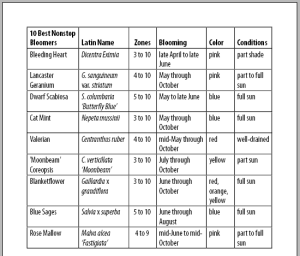 Have you tried importing from Excel into InDesign? In Book Design Made Simple we walk you through importing tables from Word, but importing a spreadsheet from Excel is a bit different so we’ll walk you through it here. And, because spreadsheets and tables rarely import into InDesign looking like they did in Excel and Word, we’ll give you a few tips on the easiest way to get started. [Read more…]
Book award contests: Are they worthwhile?
 Last fall and winter, we entered Book Design Made Simple in some independent publishing book award contests. In mid-April, we got word that our book had won gold at the Independent Publisher (IPPY) Book Awards. Nine days later, we won another gold medal, this time at the Next Generation Indie Book Awards.
[Read more…]
The value of an editor
 Dear reader, let me repeat something that you’ve probably heard before: Nobody likes a poorly written book. It doesn’t matter if the message of the book is valid or even excellent or groundbreaking. If it is not well written and constructed, people will not read it.
So please get yourself an editor. Try to find one who has experience in your general topic (science or romance, for instance), or in your form of writing (short stories, screenplay, novel). Ask for samples of work they have edited. Naturally the pieces should be readable and error-free. You’ll find editorial resources at the end of this article. [Read more…]
What your dog can teach you about book design
 For some reason I never fully noticed this before. But when I helped out at two book sale events this past fall, it became all too clear: People love dogs more than anything else. Dogs are cute. Dogs attract. Dogs are cuddly and lovable. Dogs rule. [Read more…]
Typesetting math in InDesign
 Have you ever tried to typeset any kind of math and driven yourself almost mad? And have you ended up setting each part of the equation in a different type frame, then piecing it all together and grouping it? I confess that I have done both. But with a little perseverance I figured out a way to do it properly in InDesign, and I’m hoping that this article will prevent you from suffering as long and as hard as I did. [Read more…]
Developing an eye for good design
 In Book Design Made Simple, we have given you samples and instructions that serve as foundations for your own book designs. And if you follow them, you can be certain that you have produced something very good. But are you confident about your work? Do you think it looks good? Do you wonder if anyone else will think it’s good? Do you worry that if you come up with ideas of your own they might be “bad”? [Read more…]
Designing a cookbook
 In Book Design Made Simple, we mention cookbooks a few times but never sit you down and explain in detail how to go about designing one. Once you’ve had some experience with designing and laying out other books, you’ll see at once that you’ll need to apply some extra effort to make a good-looking, readable cookbook. [Read more…]

